



What Is Generative Engine Optimization? Our Website Was Invisible to AI for 3 Months
Generative Engine Optimization is the practice of making sure generative AI systems can actually reach your website, read it, and correctly identify what it says about your business.
Most definitions describe GEO as structuring content for AI. That is the content side of the problem, and it is already covered by answer engine optimization. GEO is the connection side: whether AI can get to the content in the first place.
The distinction matters because clearly defining the two helps cut through the clutter. As it currently stands, optimizing for AI search has so many different names: AEO, GEO, LLMO, AIO, AIEO. It is no wonder the internet is confused about what any of them mean.
Here is the clarity. AEO is the practice of creating content genuinely worth citing, so that when a system reads your page it selects you as the answer. GEO is the practice of making sure that system can reach the page, read it, and correctly identify whose it is. One is about what you publish. The other is about whether it can be retrieved.
This article covers the technical side (GEO): what generative engine optimization actually is, why a site can rank perfectly well on Google but be unreadable to AI, and how it was diagnosed and fixed on this website. Website access is the first thing that has to work, which is why it sits at the front of the SEO timeline along with indexation.
When you are done with GEO, be sure to read our article on answer engine optimization, the content side of AI.
How is GEO different from AEO and SEO? Where does it fit?
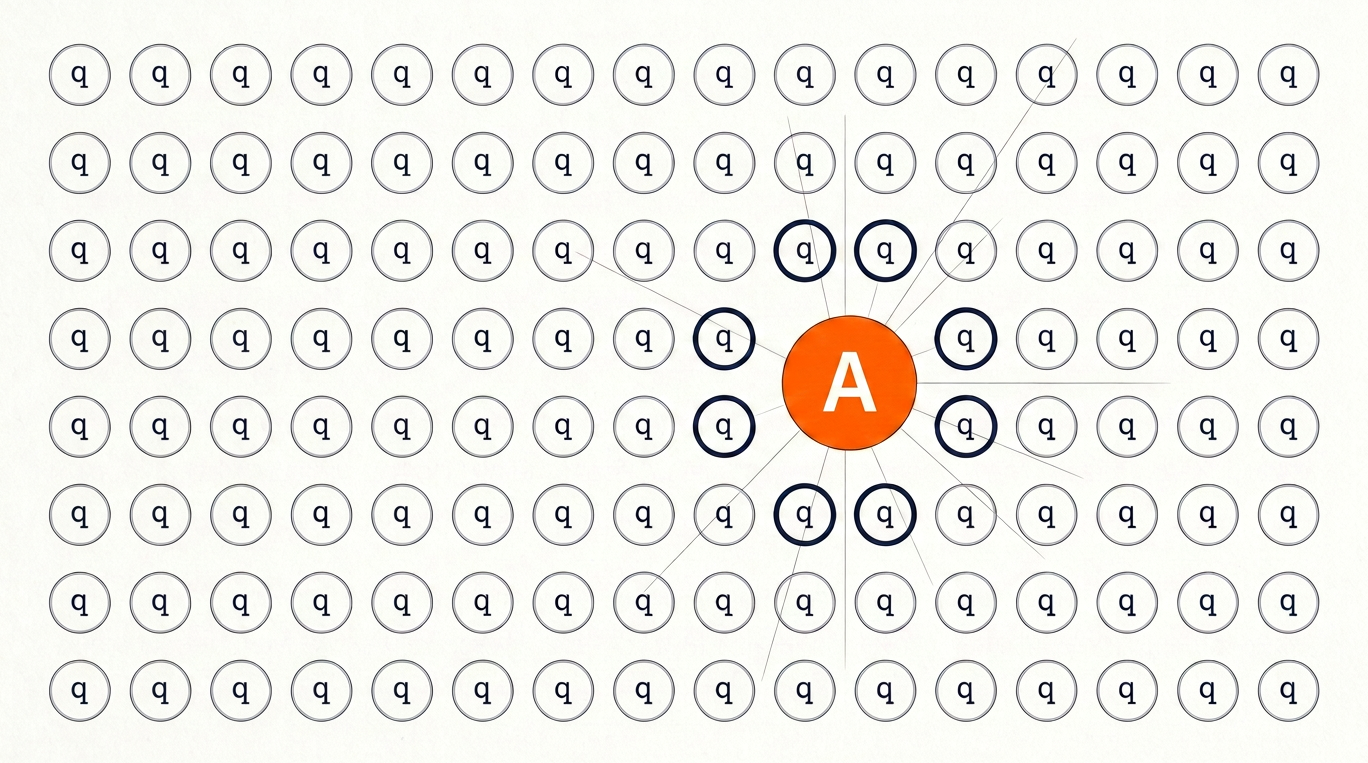
AEO is about creating content to become the answer AI systems cite. GEO is about the ability AI bots have to access the content in the first place, the technical side of AI visibility. Both branch from SEO, which is the overall visibility of your brand on search.
There are two major parts to search engine optimization: on-page SEO and technical SEO. The first is about what your website says and consists of content, keywords, headings, internal linking, and the substance of every page. The second is about whether search engines can access what your website says and consists of crawlability, indexation, site speed, mobile performance, and site architecture. AI visibility is no different. It also consists of a content aspect and a technical one. The visual below clearly shows how the two branches of SEO extend into the two branches of AI visibility.
Answer engine optimization is the expression side. It governs whether your content is worth selecting once a system has read it. GEO is the access side. It governs whether the system ever reads it at all.
Ranking on Google does not mean AI can read your site
This is the assumption that costs businesses the most, and it is entirely reasonable to make. If Googlebot crawls the site, indexes it, and you attain Google search ranking, it does not mean that your website is accessible to AI. Googlebot and the AI crawlers are operated by different companies, run from different IP address ranges, identify themselves with different user agent strings, and are permitted or refused by separate rules in your robots.txt file and your firewall. Nothing about Googlebot’s access grants access to any of the others.
5 differences that decide whether AI can read you
Googlebot renders JavaScript. Most AI crawlers do not. Google runs a full rendering pipeline that executes scripts and waits for the page to build. Many AI crawlers fetch raw HTML and stop there. This matters because the most common bot defence on the internet is a JavaScript challenge, a page that requires script execution to prove you are a real browser. Googlebot walks through it. A crawler that does not run JavaScript hits a wall.
Googlebot has twenty-five years of accumulated trust. Every firewall vendor, CDN, and hosting company has spent decades building and testing rules that let Googlebot pass. Equivalent rules for AI crawlers are two or three years old, and they do not always work as documented.
Crawl budgets are not comparable. Googlebot may visit a site thousands of times a month and retries aggressively when something fails. An AI crawler may visit a handful of times. When Googlebot gets blocked, it comes back. When an AI crawler gets blocked, that may have been the only attempt for a long while.
Google keeps a continuous index. Live AI retrieval does not. Google holds a persistent copy of your site that survives a bad day. A generative system retrieving in real time gets one attempt at that moment. If it fails, it does not wait. It answers with whatever else it can reach.
Security systems score AI crawlers as suspicious by default. Every AI crawler operates from datacenter IP addresses, and datacenter traffic is exactly what intrusion detection systems are built to distrust, because that is where automated attacks originate. Googlebot is explicitly exempted from this suspicion. Newer crawlers frequently are not.
The practical consequence: a site can pass every technical SEO audit, rank well, and still be completely unreadable to ChatGPT, Claude, and Perplexity. The tools that would normally catch a crawling problem are watching Googlebot, and Googlebot is fine.
GEO case study: our website was not being read by AI. Here’s how we fixed it
About three months ago we ran a simple test. We asked ChatGPT who InspiringClicks was, and who Adam Hamadiya was.
The answer described the business using information found on other people’s websites. Directory listings. Passing mentions on other domains. At one point it confused us with a completely different company that happened to have a similar name.
Our own website, where every piece of positioning and expertise had been carefully published, was not part of the answer at all.
Think of it this way. Imagine you own a restaurant. A food critic is writing a review of your city. They walk to your front door, find it locked, and cannot get in. So they write the review anyway, using old photos from a directory and a few comments from people who ate there years ago. The review goes out. It is not wrong exactly, but it is not your restaurant either, and you never got to show them the kitchen.
That is what was happening. AI was answering questions about us using everyone else’s description, because it could not get through our own front door.
Google had no trouble at all. The site was crawled, indexed, and ranking normally the entire time. This is the point that most businesses miss: traditional SEO signals and Google rankings can hold steady even when a site has no AI visibility whatsoever, because the two are measured by different crawlers under different rules. Generative engine optimization is a matter of tapping into another avenue of search by ensuring the technical signals are strong on the AI side as well.
Successful GEO relies on fixing technical aspects
Many people assume that poor AI visibility is a content problem; however, this is not always the case. AEO is the content side. GEO is the technical side. Separating what is true from what is assumed is the key to solving visibility issues on AI search.
Scroll to see all columns
| What is assumed | What is true |
|---|---|
| AI has not found the site yet | AI may have tried repeatedly and been turned away |
| The content needs improving | The content may never have been read |
| Google rankings mean the site is accessible | Google can be the only crawler getting through |
| Something would have raised an alert | Nothing looks broken to any standard tool |
Why a blocked AI crawler does not trigger any alert
Most people expect a blocked visitor to look like an error. A locked door, a refusal, something red in a report somewhere. That is not what happens.
Many websites will have GEO issues without knowing it because website security systems are quiet. When visitors arrive from an address the system does not trust, the security system or firewall does not refuse them. It sends them to a check page that runs a small background script to confirm a real browser is present. On a normal computer, this is completely invisible: the browser runs the script automatically and you land on the real page in a fraction of a second, with nothing to click and nothing to notice. Most AI crawlers cannot run that script at all, so they arrived at a page with no content on it and left.
Think of your firewall as a bouncer. A bouncer who turns someone away creates a scene. Everyone notices. But a bouncer who smiles, says “of course, right this way,” and shows the guest into an empty side room creates no scene at all. The guest waits, realizes nobody is coming, and quietly leaves. From inside the building, the night looked perfect.
Since nothing was ever refused, nothing was ever logged as a problem in the firewall’s security reports; therefore, our uptime monitoring was happy. Google Search Console was clean, because Google was unaffected. Our rankings held steady on organic search, and there was no alert anywhere in the standard toolkit for an AI bot who arrived, was politely shown to an empty room, and left.
To fix our GEO issue and start getting found on AI systems, we needed to do digging. Here is what the firewall logs actually showed once we asked for them.
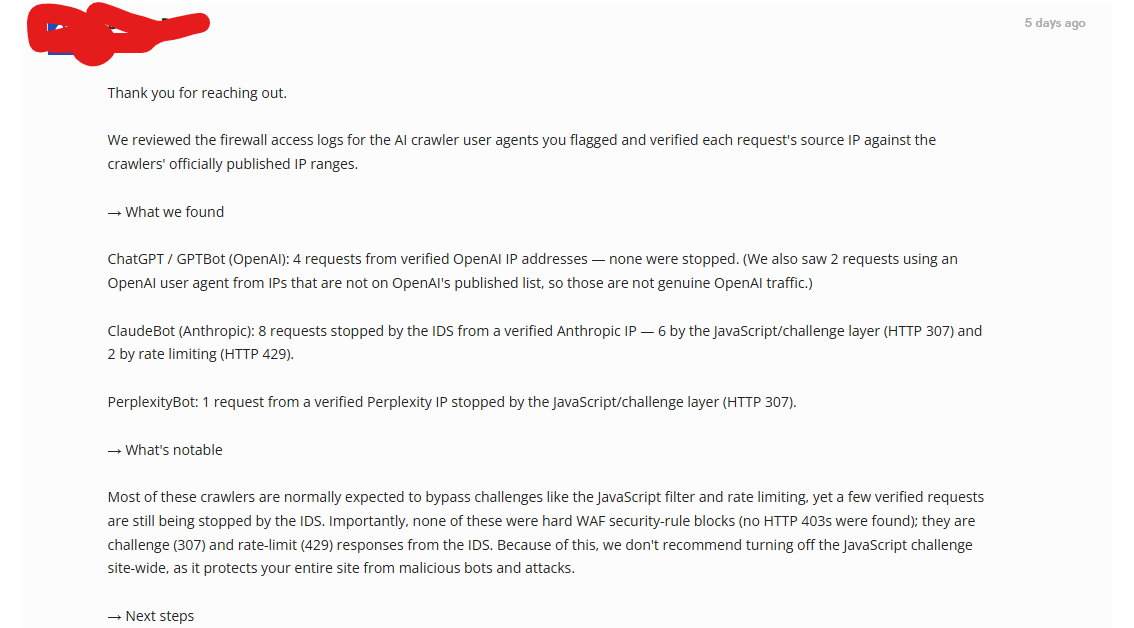
Two things in that log are worth pulling out for anyone checking their own site.
- Different AI companies got different results on the same website, on the same day, under the same settings. OpenAI’s crawler walked in. Anthropic’s was stopped every single time. Perplexity’s was stopped too. Access is not one thing you either have or do not have. It is granted or denied separately for every AI system, which is exactly why GEO exists as a separate concern.
- The rate limiting was triggered by almost no traffic. Anthropic’s crawler visited eight times in total, and two of those visits were turned away for visiting too often. Rate limits are built to stop floods of thousands of requests. A visitor arriving eight times should never trigger one.
Why testing from your own computer gives a false result
Before contacting anyone, we tested it ourselves. Every visitor to a website announces what it is using a short line of text called a user agent string. A browser announces itself as Chrome or Safari. Google’s crawler announces itself as Googlebot. ChatGPT’s announces itself as GPTBot.
So we used a command line tool called curl, which fetches a web page and lets you set that line of text to whatever you want. We requested our own homepage while announcing ourselves as GPTBot, from a laptop on a normal home internet connection. The full page came back perfectly.
That test was not useless. It proved the firewall was not filtering by user agent string, meaning it was not turning visitors away for calling themselves an AI crawler. But it also produced a completely misleading all-clear, and understanding why is the single most useful thing in this article.
The firewall was not judging visitors by what they called themselves. It was judging them by where they were connecting from, which is to say their IP address. Every device on the internet has one. It is the return address on the envelope, and unlike a user agent string, it cannot simply be typed in.
Security systems score those addresses by reputation. Residential IP addresses, the kind your home internet provider assigns, score well, because that is where ordinary people browse from. Datacenter IP addresses score poorly, because that is where automated attacks are launched from.
Every AI crawler in existence operates from a datacenter IP address. Our laptop was on a residential one. We were never testing the thing that was actually being tested.
Put simply: we tested the lock by using our own key from our own driveway. Of course it opened. The visitors being turned away were arriving from an address the building did not trust, and no amount of testing from the driveway would ever reveal that.
This matters because the do-it-yourself test almost everyone recommends, pretending to be a crawler and loading your own page, cannot detect this kind of problem. The only real evidence is the security system’s own record of what happened when the actual crawler arrived.
Why firewalls treat AI crawlers as suspicious in the first place
It would be easy to blame the firewall. That would be the wrong lesson.
In those same logs there were requests claiming to be OpenAI’s crawler that were coming from addresses OpenAI does not use. In other words, someone was impersonating an AI crawler to get into our website.
That is exactly why security systems treat this traffic with suspicion. Anyone can claim to be ChatGPT’s crawler, because that claim is just a line of text that anyone can type. The only way to tell a real one from a fake one is to check the visitor’s actual address against the list each AI company publishes.
So the firewall was doing its job correctly. It simply had no way to tell the genuine crawler from the imposter, and it defaulted to caution. This is not a story about bad security. It is a story about security rules that were written before AI crawlers existed, meeting a kind of visitor nobody had planned for.
How to allow AI crawlers through a firewall
To make sure your website is visible to AI systems like ChatGPT, Claude, and Perplexity, ask your host to add each AI crawler’s published IP address ranges to your firewall’s allow list, so verified crawlers bypass the security check while the firewall stays fully active for everyone else.
Each company publishes its ranges at a fixed address, kept up to date for exactly this purpose:
- GPTBot (ChatGPT) —
openai.com/gptbot.json - OAI-SearchBot (ChatGPT search) —
openai.com/searchbot.json - ClaudeBot (Claude) —
claude.com/crawling/bots.json - PerplexityBot (Perplexity) —
perplexity.ai/perplexitybot.json
Send that list to whoever manages your firewall, which is usually your host or security provider. They can verify traffic against it and allow the genuine crawlers through.
These lists exist precisely so that security systems can tell a real crawler from an imposter, since the address is the one thing that cannot be faked. That is what made the fix possible on our own site.
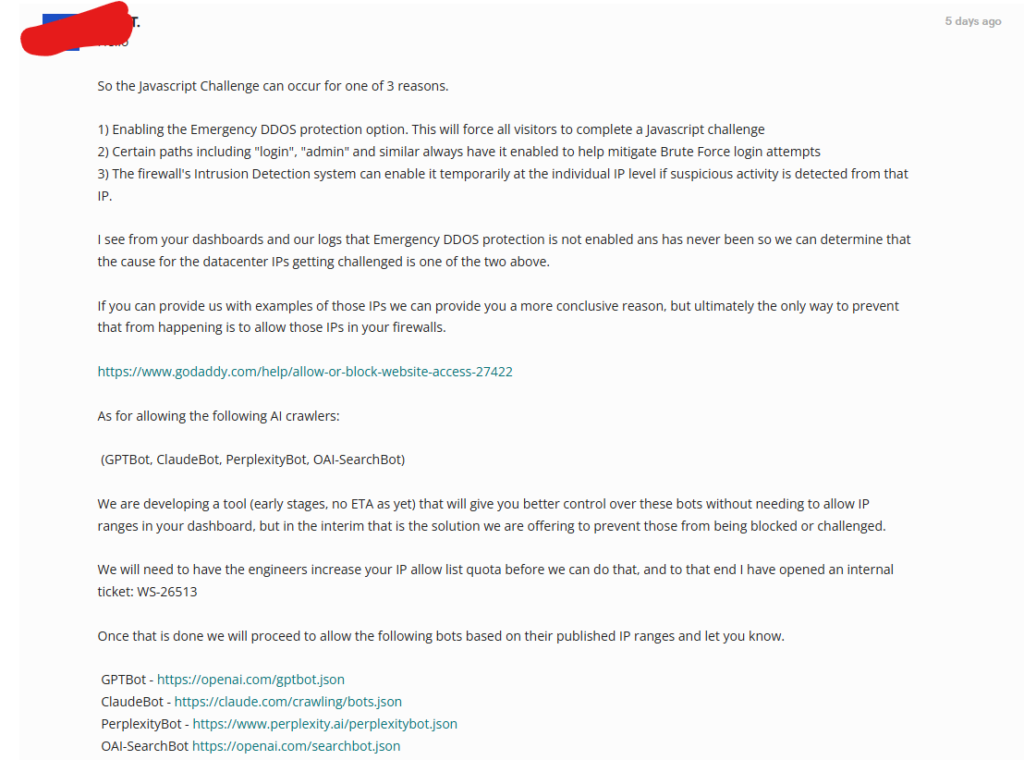
Two things caught us out along the way, and both are worth knowing before you start.
Approved-visitor lists have a size limit. Those published address lists are long, and our account could not hold all four crawlers until the limit was raised. That is a request you make to your host, not something you can change yourself.
The lists change over time. When an AI company adds new addresses, a firewall that has not been updated will start turning the new ones away, and the problem quietly returns with no warning. Ask your host directly whether they keep these lists updated, or whether checking is now your job.
What improved once AI crawlers could read the site
Once the crawlers could get in, we asked the same questions again. The answers were different.
Descriptions of the business now reflect what our website actually says: the services we offer, the way we work, the positioning we built deliberately across the site. The confusion with the similarly named company stopped.
Not a single word of content was rewritten to achieve that. Not one page was changed. The only difference is that AI could finally read what had been sitting there all along.
This is the entire case for GEO. Every hour spent improving what your website says is wasted if AI cannot open the page. Content quality is the answer engine side of the problem. Access is the generative engine side, and access has to come first, because nothing downstream of it works until it does.
How to know whether your own site is visible to AI crawlers
You do not need to be technical to run the first few checks. Start here.
- Ask AI who you are. Ask ChatGPT, Gemini, and Perplexity what your business does. Do it logged out, in a private browsing window, ideally on a device you have not used to research yourself. Personalization will otherwise show you results a stranger would never see.
- Look at where the answer came from, not whether it is flattering. If the description is stitched together from directories and other people’s mentions while your own website is nowhere in it, that is your warning sign. It means AI is describing you without having read you.
- Screenshot everything before you change anything. Once the problem is fixed, the evidence is gone permanently. We learned this the hard way and no longer have our own before picture.
- Ask your website host one specific question. “Are requests from AI crawlers being challenged or rate limited by our firewall?” Ask them to check the actual request logs and to verify the visitor addresses against each AI company’s published list.
- If the answer is yes, ask them to allow those published addresses through. This does not mean weakening your security. It means telling the firewall which visitors are genuine.
- Check again a month later. Ask the same questions you asked in step one and see whether the answers now reflect your own website.
One warning about AI visibility tools. We were using them throughout this period, and they all reported that things looked fine. They were not broken. Most of these tools measure how often your brand gets mentioned by AI, not whether your own website is what AI is reading. We were being mentioned. We were just being described by other people’s pages. A tool counting mentions will never catch that.
How to apply GEO to your own website
To make sure search engines and AI systems can access your website, check the technical signals before you touch the content. Access comes first, because everything downstream of it depends on it. The table below covers what to check and what each check tells you.
Scroll to see all columns
| What to check | What it tells you |
|---|---|
| Your robots.txt file permits AI crawlers | Whether you are turning them away on purpose |
| Your firewall allows their published addresses | Whether they are turned away by accident |
| Request logs show successful visits, not redirects | Whether they are reaching real content |
| Your content is in the page itself, not loaded by script | Whether crawlers can read it once inside |
| AI answers mention your website by name | Whether any of the above is working |
| Your content genuinely answers what people ask (AEO) | Whether the page is worth citing once AI can read it |
Not sure whether AI can read your website?
We audit crawler accessibility alongside the rest of the search work, so the content you publish is actually reachable by the systems that decide what gets cited.
A strategy call is a quick, no-pressure conversation. Discuss your marketing with a specialist, ask your questions, and get clear next steps.
If you would rather write than call, the request form takes about thirty seconds and we reply within one business day.