



How Do I know If My SEO Is Working?
To know if SEO is working, you need to see measurable increases in the variables that make up the SEO process.
SEO is working when your website shows measurable growth in four key areas: indexed pages, keyword impressions, average ranking position, and organic clicks. These metrics follow a natural sequence in Google’s search process, which means you can often see signs of SEO progress long before traffic significantly increases.
- Organic Pages: The number of pages from your website Google has crawled and accepted into search results
- Organic Impressions: The keywords you rank for from those pages
- Organic Clicks: The search traffic, or Click-Through-Rate (CTR) achieved from keyword impressions
There’s a common misconception that to know if SEO is working, you need to see an increase in clicks; however, impressions come before clicks, and pages come before impressions. Instead of waiting months to know whether your SEO is working, look for an increase in both.
This means you can often see early signs of SEO progress long before traffic arrives. For example, during seasonal events like the Calgary Stampede, businesses often see impressions surge weeks before the event as tourists begin searching for things to do, places to shop, and local services. If you’re curious how companies prepare for that spike in visibility, read our guide to Calgary Stampede marketing and SEO for local businesses.
But for this article, we’re going to explain the science behind SEO, then give you 5 questions to ask to help you know if your SEO is working.
The Science of Search Engine Optimization
The process of ranking on Google follows set rules that make it possible to know if your SEO is working or not in as little as a month. That makes Search Engine Optimization a science in some respects. When something follows the same process no matter how many times it’s tested, then that thing is rooted in science.
The science of Search Engine Optimization is about understanding how search engines rank content, and it turns out that Google does this in a repeatable way that you can observe. It is NOT about understanding how to rank on page one for a particular term. You cannot expect search engines to rank you on page 1 of Google, but you can expect them to follow the same process, and you can see things happening that tell you whether your SEO is working or not.
How Google’s Ranking Process Shows If SEO Is Working
| Process | What Happens | What You See in Tools |
|---|---|---|
| Crawling | Googlebot discovers and reads the page through links or sitemaps. | Crawl stats, crawl status in URL inspection tool. |
| Indexing | Google stores the page in its search index so it can appear in search results. | Indexed status in Google Search Console. |
| Ranking | Google determines where the page should appear for specific search queries. | Average position in Google Search Console. |
| Impressions | The page appears in Google search results when users search for related queries. | Impressions in Google Search Console. |
| Clicks | A user clicks the search result and visits the website. | Clicks and CTR in Google Search Console. |
There are many tools that you can use to see if SEO is working or not; however, Google Search Console is the most effective one and it’s free. Let’s begin.
1. Are Your Pages Crawlable by Google?
Crawling is when Google discovers pages, and it is the first step Google takes to make sure your pages are available to rank in search. If pages aren’t crawlable, Google won’t be able to submit them into search, and therefore, wont rank for anything. You’ll know the status of a page’s crawlability by simply inspecting any URL in Google’s search console, and clicking on Live Test.
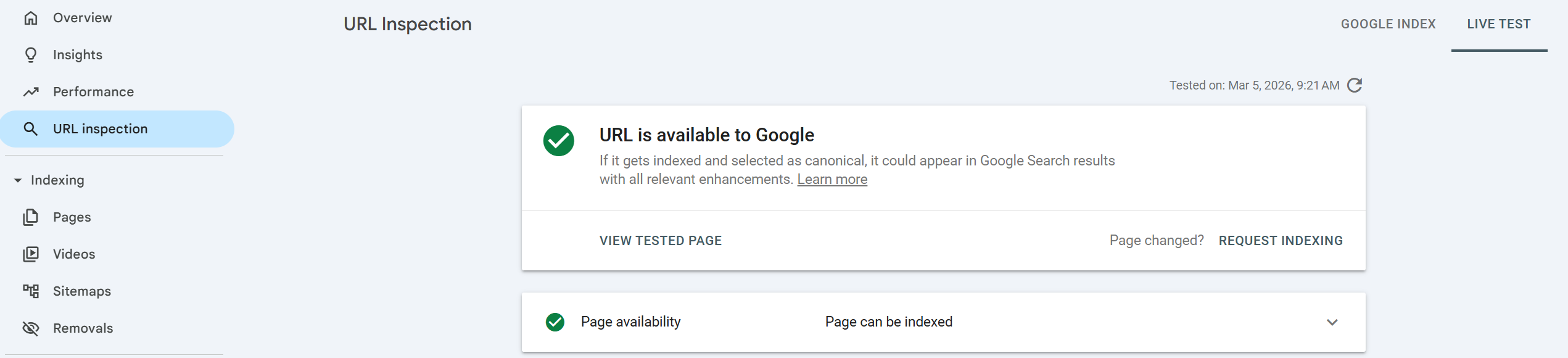
If pages are not available to Google, you’ll see “URL is not available to Google” in the indexing report.
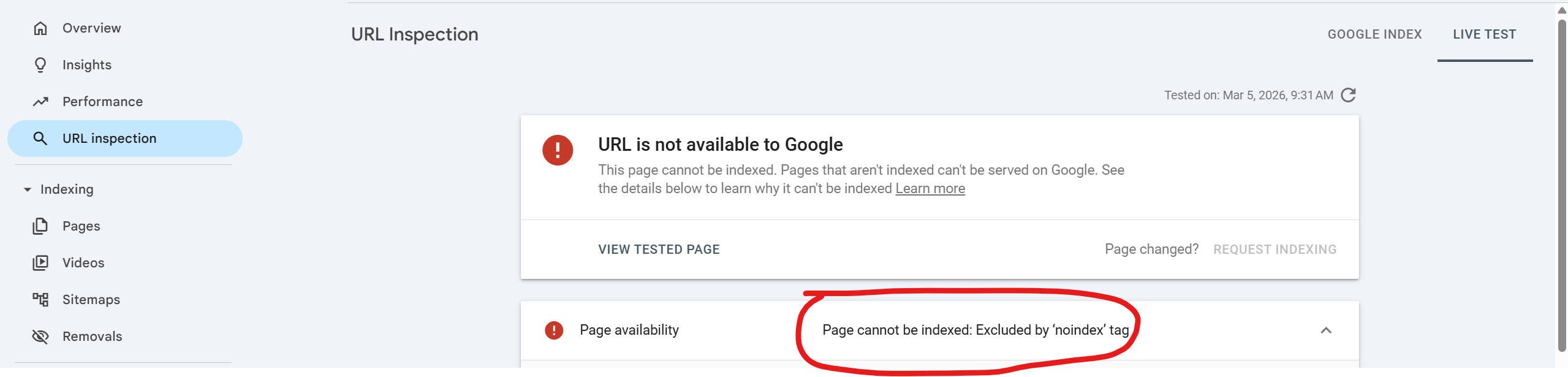
This is usually because the page is excluded by a ‘noindex’ tag, and the solution is to set the page to index on your meta settings or SEO plugin.
2. Are Your Pages Being Indexed By Google?
After pages are crawled (discovered), they are then submitted by Google into search in a process called indexing. There are instances where inspecting a URL on Google Search Console will show that a page is discovered by Google, but not indexed. This means that Google knows the URL exists but has chosen not to submit it on search results.
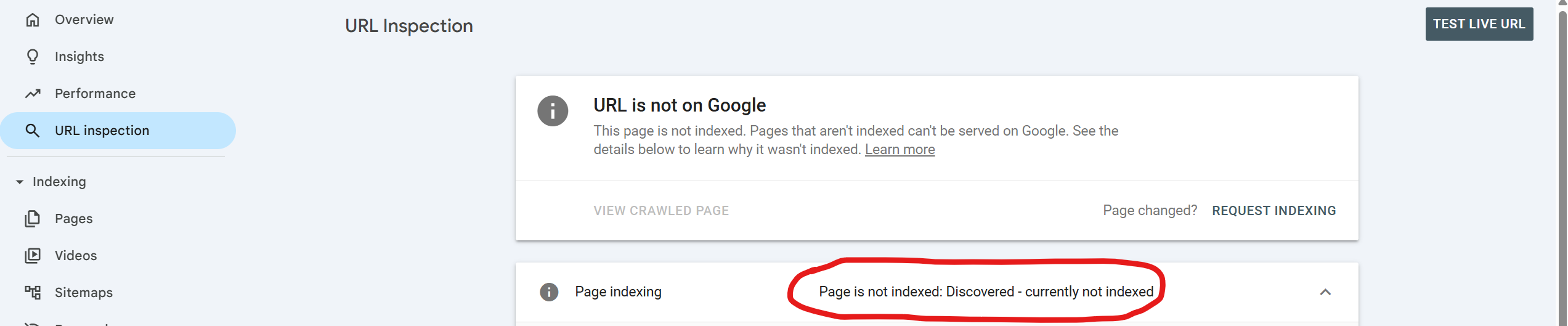
This can be because of any number of reasons, and the solution is to plug and play.
- Make sure your content is not a duplicate or very similar to another page on your website
- Make sure the page is original and not copied or AI-generated
- Make sure the content is not thin, but in-depth and genuinely helpful
- Make sure the canonical tag is pointing to the actual URL of the page and not another URL
If the page is very similar to another page on your website, or a canonical tag is Pointing to another URL, Google may not index the page. If neither of these things are a problem, then it’s usually a matter of content quality.
3. Is Your Average Position Increasing in Google Search?
After Google discovers (crawls) and submits (indexes) pages into Search Engine Result Pages (SERPs), the page will have a position on SERPs that shows where your page appears in Google’s search results for a given keyword.
There are likely thousands of pages for any given search, so a position that goes from 100 to 20 is a clear indicator that SEO is working; regardless of whether the position is in the top 10 or not.
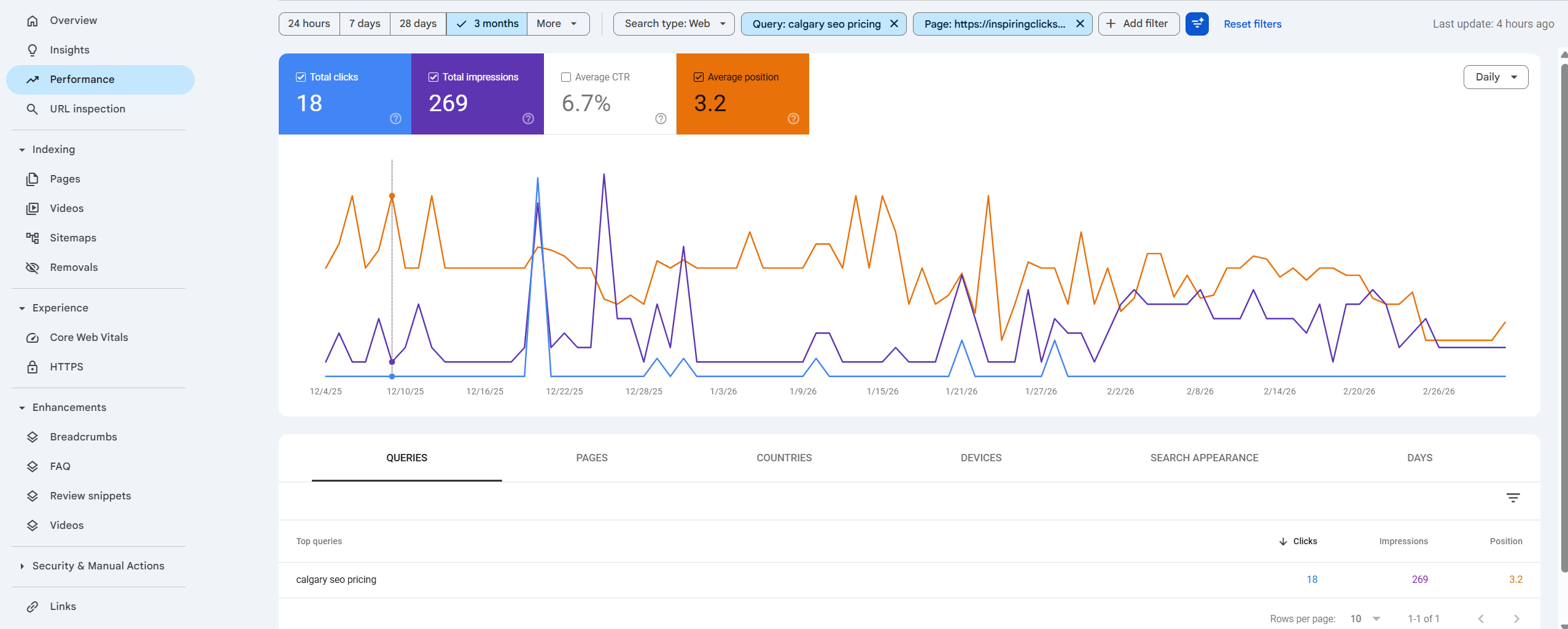
4. Are You Getting Keyword Impressions?
Keyword impressions are how many times your page is appearing on search for a particular keyword. Impressions come before clicks, because for a person to click on a page, they must first see it, and every time they see it, it is recorded as an impression on Google Search Console.
Getting impressions on keywords is a sign that if you start ranking higher, you will start ranking for the keywords showing on impressions. Impressions tell you exactly what Google thinks your website is about. If those keywords are in alignment with what you are targeting, then your SEO is on the right track. If it is not, then you will need to revisit your pages and align them with what you are targeting.
This is important because nothing is worse than spending months on an SEO campaign only to find that the keywords you get clicks for are not getting conversions.
5. Are You Getting Organic Clicks From Google?
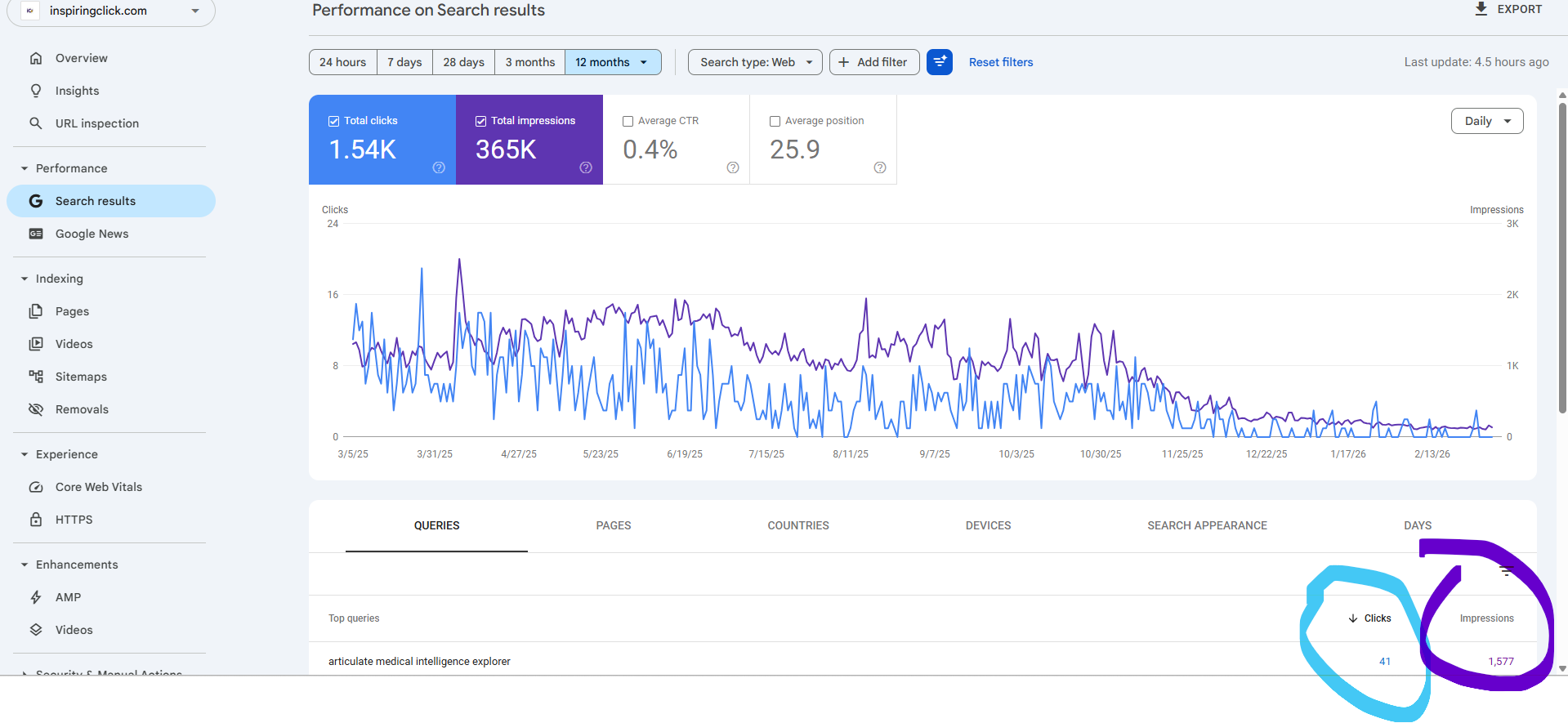
Clicks come from the impressions you have on Google Search; therefore, the best way to know if SEO is working is to see an increase in clicks on your Google Search Console.
It’s important to note that Google Search Console only gets data from Google Search and not other search engines, or direct visitors who search for your website by using your URL. Tools like SEMrush or Ahrefs will show data that differs, even between one another. While these tools are helpful, Google is the most accurate representation of organic search growth.